How to Set Up a Job Board in a Discord Community That Members Trust: Four Parts and a Named Reviewer
A one-time poster check, a fixed form, a private review queue and a read-only channel, plus who owns the queue and how to test the path before it opens.
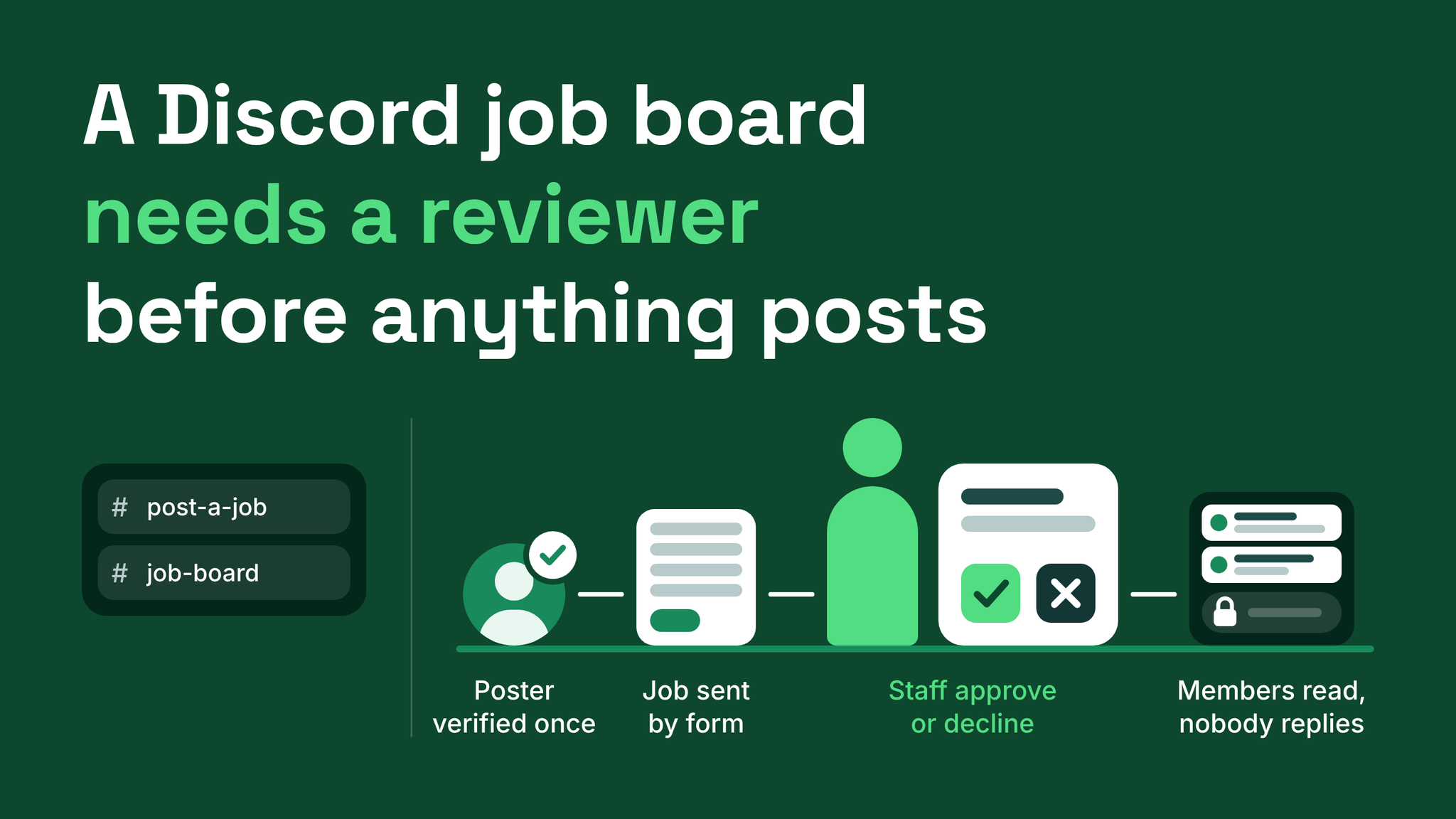
The setup that works: four parts and one person
A Discord job board that members keep reading has four parts and one person in the middle of them. Posters are checked once and given a role. Every job comes in through the same form. A named member of staff approves or declines each submission in a private channel. Approved jobs appear in a channel that members can read and cannot reply in, and every post states how to respond.
The usual alternative is a single open channel where anyone posts and anyone replies. Two things go wrong in it, and they feed each other.
Replies bury every post. Members pitch themselves under each offer, so the next job is pushed out of sight and the poster is flooded.
Serious businesses leave because of the replies, and members leave because of the offers. The fix is to give the two groups separate doors and to put a reviewer between them. I use the name reviewed job board for the result, and its parts are these:
| Part | What it is, in plain words | What it prevents |
|---|---|---|
| Verified poster role | A one-time profile check that ends with a role | Unknown accounts posting work |
| Submission form | Fixed fields behind a button | Posts with no budget or no way to respond |
| Review queue | A private staff channel with approve and decline | Anything reaching members unread |
| Read-only board | A channel members read and cannot write in | Pitches piling up under each job |
A few plain definitions before the detail. A role is a label on a member that controls what they see and can do. A bot is an automated account that runs the forms and does the publishing. A permission is a per-channel setting for a role, such as being able to send messages. The tool requirement is modest: a bot with forms and an approval step.
Verified poster role: checking the person once
Start with who is posting. In the channel where jobs are submitted, a button labelled Get poster access opens a short profile form. It asks who the person is, what their business does and for a link where members could look them up.
The reviewer sees that profile in the staff channel and opens the link before deciding. A working link that matches the name is the bar. On approval the bot assigns a role such as @Verified Poster, and the role's only job is to open the job form. It should carry no moderation permissions and unlock no other channels.
Because the check is done once, a business that posts regularly never repeats it. The reviewer also gets a cleaner job: one decision about the poster, made once, and then a smaller decision about each job that poster submits.
Declined profiles need a policy written before launch.
Decide who stays. A poster with an incomplete profile, or an offer the board does not carry, can stay in the server and resubmit. A deceptive profile, or one that follows a known scam pattern, is removed.
Writing that down means the reviewer applies a rule and never has to invent one under pressure.
Submission form: one set of fields for every job
Verified posters press Post a job and get a form. It has four required fields:
- The work. Two or three sentences on what needs doing.
- Budget or range. A figure or a range.
- Timeline. When the work starts and when it is due.
- How to respond. One method only, whether that is a link, an email address or a direct message.
Typing a post freehand is never offered. When people write job posts freehand, the budget is the detail that goes missing, and members cannot judge an offer without it. Required fields close that gap. They also give every post the same order, which lets a member scan the board quickly.
Put two rules on the panel above the buttons so nobody is surprised by a decline:
A budget means a figure or a range. "Negotiable" alone is declined. If the board does not carry unpaid or commission-only work, the panel says so.
Channel names carry instructions too. #post-a-job describes the action, so a business knows it is in the right place. #apply-here describes nothing, and members who want work will press its buttons by mistake. For a member who presses Post a job without the role, have the bot reply privately with a pointer to Get poster access.
Review queue: where a named person approves or declines
Each submission is delivered to a private channel, for example #job-review, with Approve and Decline beneath it. Approving publishes the job. Declining sends the poster a short reason and leaves them free to resubmit.
The reviewer checks four things:
- Can a member tell from the description whether they qualify?
- Is the budget a figure or a range?
- Does the response method work when you open it?
- Does anything ask members to pay, buy or hand over personal documents before work starts? If so, decline.
Fixing wording. Discord lets only the author edit a message, and administrators are no exception. A reviewer who spots a typo cannot correct the submission where it sits. The route is to copy the text, correct it, publish the corrected version and let the poster know what changed. Limit this to spelling and clarity. A change to the budget or the terms is the poster's to make, so decline and ask for a new submission.
Owning the queue. Fill this in before the board opens:
Review queue owner ................. one named person
Backup when the owner is away ...... one named person
Answer time for a submission ....... a promise you can keep, such as one working day
Decline reasons are recorded ....... as a reply under the submission
Then publish the answer time on the submission panel. Posters tolerate a wait they were told about. Silence reads as a dead board, and a business that gets no answer takes the job elsewhere and does not come back.
Read-only board: where members read and nobody replies
Approved jobs go to #job-board. The bot posts there and members do not. Set the member role's permissions on that channel as follows.
| Permission | Setting | Why |
|---|---|---|
| View Channel | On | Members can find the board |
| Read Message History | On | Members can read earlier jobs |
| Send Messages | Off | No pitching under posts |
| Create Public Threads | Off | No reply threads on a job |
| Create Private Threads | Off | The same reason |
Threads are the setting people miss. With threads allowed, members start one under a job and the pitching returns. Forum channels share the problem because each forum post is its own reply thread.
Every published job carries the response line from the form, and it should be exact about where to go and what will be ignored.
How to respond: Use the form at the link below. Direct messages are not read.That one line is what keeps posters from being flooded. Responses arrive in one place and the poster works through them on their own schedule.
Three smaller decisions finish the board:
- Closing. Give every post a closing date, and have the reviewer clear expired posts in a weekly sweep. Filled jobs left on show make the board look unattended.
- Visibility. If only members who have completed a step, such as a member profile, may use the board, keep it visible and locked for everyone else. Seeing a channel, reading its history and sending messages are separate Discord permissions, so a channel can appear in the sidebar without being usable. A visible locked board shows members what they are working toward.
- Introductions. Members who want work will look for somewhere to present themselves. Give them a separate channel with its own form and keep it away from the board.
A test run with three accounts
Before opening, walk the whole path with a test account in each role: a member with no role, a verified poster and a reviewer.
Post a job and is sent to Get poster access.#job-board.View Server As Role in Discord's settings is useful for a quick look at what a role can see. Use it alongside the test accounts, since only a real account shows what happens when a button is pressed.
The wider system around the board
The job board belongs to role and channel architecture, the part of a server that decides which roles exist, what each one opens and where each kind of member goes to act. The other layers are onboarding, moderation, support routing, automation coverage and reporting. The board touches all of them. #start-here points posters and job seekers to their separate doors. Moderators redirect pitching in other channels to the board. Reporting takes its monthly counts of submissions, approvals and declines from the review channel.
None of the four parts is difficult to build. The part that takes discipline is the reviewer answering inside the promised time, every week.
Members judge a job board by the worst offer they find on it. Putting one person between every submission and the channel keeps that offer from ever appearing. More at danieljeong.org.
Want a properly managed community?
Get Your Free Analysis →